Skin Manager Documentation V1.0
TABLE OF CONTENTS
Workflow
1 - Create or Download the Base Model for Blender.
2 - Texture UV using Photoshop or Substance Painter.
Make the texture the size you want but then resize them, keeping the source of the highest quality.
Keep textures around 1024x1024 no more than 2mb the lowest the better
3 - Export Images from selected programs.
4 - Pass through https://tinypng.com/
5 - Go to https://krunker.io/?sandbox&skin_manager
6 - Add New Item
7 - Play and Enjoy
Resources:
Reduce Texture size: https://tinypng.com/
Skin Manager: https://krunker.io/?sandbox&skin_manager
Texture viewer with configs: https://krunker.io/viewer.html?dev
GBL test error: https://gltf-viewer.donmccurdy.com/
Skin Manager Overview
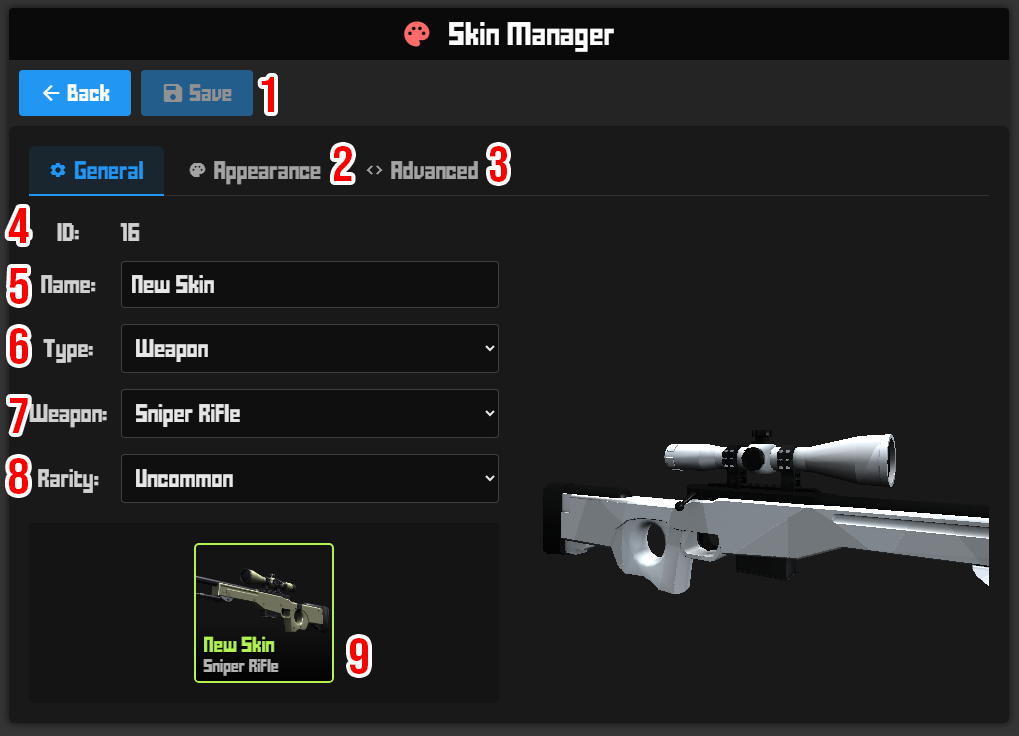
1 - Save Button
2 - Appearance Tab (next images)
3 - Advanced Tab (last Page)
4 - ID (unchangable)
5 - Name of Skin
6 - Type of Skin
7 - Category of Skin
8 - Rarity to be
9 - Preview (ignore for now)
Model Area
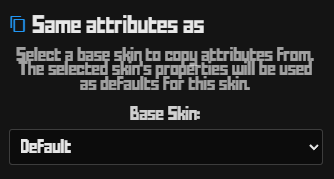
Here you can add a skin that already exists in that category either model or even settings you want from it.
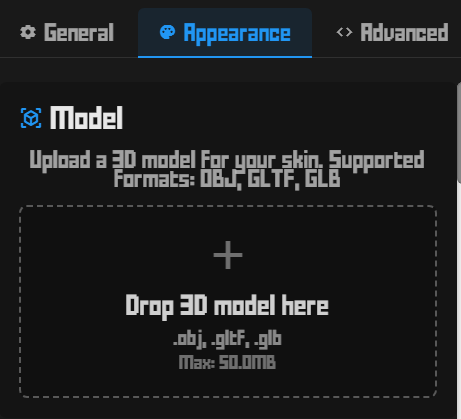
Upload your Model here if not the Default model.
USE the BASE MODEL TO KEEP THE MODEL IN 0 0 0 axis in Blender and same SCALE. That way you don’t require to do many changes.
- OBJ for just the model
- GLB for packaged texture or animation
Texture Area
This is in case the Texture has a Transparency or a Pulse for the Emissive.
- If in case it has a PNG Transparency make sure you toggle it and pulse has Fast / Slow option.
- If it is a GBL, ignore this step.

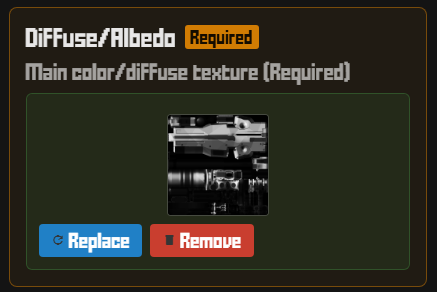 |
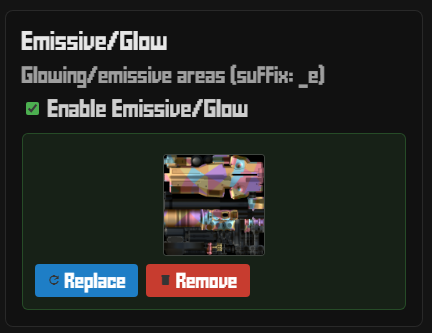 |
Diffuse/Albedo/Color texture goes here. - Make the texture the size you want but then resize them, keeping the source of the highest quality. - Keep textures around 1024x1024 no more than 2mb the lowest the better - If it is a GBL, ignore this step. | Emission Glow texture goes here: - Make the texture the size you want but then resize them, keeping the source of the highest quality. - Keep textures around 1024x1024 no more than 2mb the lowest the better - If it is a GBL, ignore this step. |
Sound Area
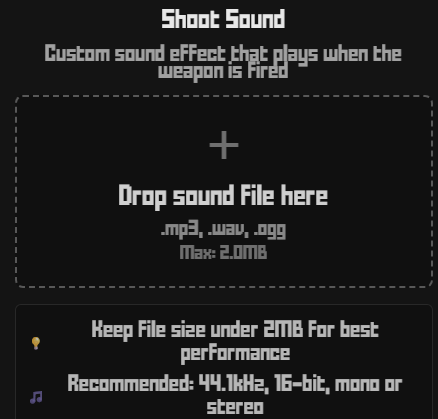
Shooting Sound Effect goes here:
- Keep file size under 2MB the lower the better
- Recommended Setting are on the image:
Advanced Setting Area
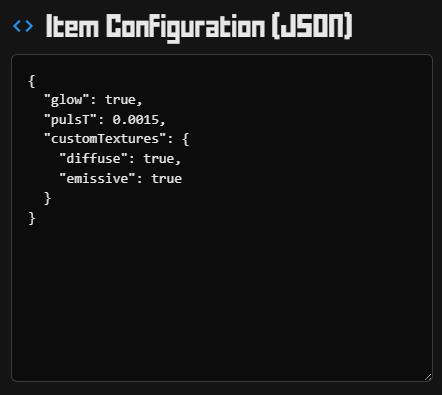
This area is the Json file Config. If you based your mesh and model on a current skin that exists you can copy its Config from https://krunker.io/viewer.html?dev
- Make sure you add “quotes” to the settings to work if not it wont validate.
- There are 180 properties that I will list below the image.
- aimY | This is the aim Y position |
- alpha | If texture is Transparent ( already in the toggle) |
- animInd |
|
- animS |
|
- attachAimY | Attachment Aim Y Position |
- attachBypass | Attachment Bypass on Aim |
- attachScale | Attachment Scale Position (based on Origin) |
- attachYOff | Attachment Y Position Offset (based on Origin) |
- attachZOff | Attachment Z Position Offset (based on Origin) |
- battlepass | If its a Battle Pass Item (Ignore) |
- blackM | If its allowed on Black Market (Ignore) |
- blocked | (Ignore) |
- bundle | If its a Bundel Item (Ignore) |
- cSwing | Custom Sound fort Swing |
- challenge | If its a Challenge Item (Ignore) |
- charmMScl | Charm Scale (based on Origin) |
- charmMXOff | Charm Mount X Position Offset (based on Origin) |
- charmMYOff | Charm Mount Y Position Offset (based on Origin) |
- charmMZOff | Charm Mount Z Position Offset (based on Origin) |
- charmScl | Charm Scale (based on Origin) |
- charmXOff | Charm X Position Offset (based on Origin) |
- charmYOff | Charm Y Position Offset (based on Origin) |
- charmZOff | Charm Z Position Offset (based on Origin) |
- classIndex | (Ignore) |
- collection | (Ignore) |
- color | (Ignore) |
- craftable | If its Craftable |
- creator | Name of Crator |
- drop | Twitch related |
- emiss | If has emessive (ignore for now) |
- env | (Ignore) |
- event | If is for an event |
- expScl | (Ignore) |
- explode | Only for throws |
- fileExt | Use for Gbl - “gbl” |
- flipAnim | If has |
- forceAttach | If attachment is mandatory |
- frameT | (Ignore) |
- frames | (Ignore) |
- free | If item is free |
- funds | (Ignore) |
- glow | If emissive - “true” |
- glowInt | Intensity of emressive |
- hairCol | Hair color (dye) |
- hasAnim | If has inspect anim or idle. |
- hide | (Ignore) |
- id | ID of item (Ignore) |
- inspS | ???? |
- inspSLoop | Inspect animation name |
- itemShop | (Ignore) |
- jumpSnd | (Ignore) |
- keyW | (Ignore) |
- killSnd | (Ignore) Sound for Weapon done on UI. |
- kpd | Kpd only |
- leftHoldX | Position hold weapon X LEFT |
- leftHoldY | Position hold weapon Y LEFT |
- leftHoldZ | Position hold weapon Z LEFT |
- legLen | For Boots (removed bottom length) |
- limG | (Ignore) |
- limT | (Ignore) |
- limited | If is Limited |
- lore | (Ignore) |
- lowR | (Ignore) |
- mScl | (Ignore) |
- mSeas | (Ignore) |
- mapReward | If is raid reward or map |
- mid | (Ignore) |
- midT | (Ignore) |
- minGlo | (Ignore) |
- minQuickSell | (Ignore) |
- movD | (Ignore) |
- movT | (Ignore) |
- name | Name (ignore use UI) |
- noAttach | Remove all attachments. |
- noBody | For Body, if you don’t want main body |
- noCharm | No charm can be attached |
- noComp | (Ignore) |
- noEmis | No emission |
- noHair | No Hair (HAT/Head piece) |
- noHead | No Head (Head piece) |
- noLeftSleeve | No Sleeve (wrists) |
- noLegs | No Legs (Waist) |
- noMuz | (Ignore) |
- noQuickSell | (Ignore) |
- noRightHand | (Ignore) |
- noSale | (Ignore) |
- noScope | No Scope for weapons |
- noShine | (Ignore) |
- noSleeve | No Sleeve for Dyes |
- noSnd | (Ignore) |
- noSpin | Animation Spin removed |
- oFlip | (Ignore) |
- opac | (Ignore) |
- opacity | (Ignore) |
- osxOff | (Ignore) |
- osxRot | (Ignore) |
- osyOff | (Ignore) |
- oszOff | (Ignore) |
- package | (Ignore) |
- pantsCol | Color of Pants (dye) |
- particle | Particles (ignore for now) |
- pat | (Ignore) |
- premiumSpin | If is Premium spin |
- prevRot | (Ignore) |
- priceMlt | (Ignore) |
- projection | (Ignore) |
- pulsT | Pulse of emissive Time (ignore is used on other stuff) |
- qsKR | (Ignore) |
- rAnim | (Ignore) |
- rAnimA | (Ignore) |
- rAnimM | (Ignore) |
- rAnimT | (Ignore) |
- randomLeg | If leg where boots is Random (only 1 piece) |
- ranked | If is ranked reward |
- rarity | (Ignore) added on UI |
- region | (Ignore) |
- reloadSnd | Reload Sound (ignore) |
- replaceHair | (Ignore) |
- req | (Ignore) |
- reqAmount | (Ignore) |
- reqT | (Ignore) |
- reqVar | (Ignore) |
- rgb | (Ignore) |
- rgbS | (Ignore) |
- rightHoldX | Position hold weapon X RIGHT |
- rightHoldY | Position hold weapon Y RIGHT |
- rightHoldZ | Position hold weapon Z RIGHT |
- rot | Rotation of Object (fiddle) |
- rotOffA | Rotation of Object Offset (fiddle) |
- rseas | (Ignore) |
- sameGlow | Glow/emessive is same as Albedo |
- scl | Scale of object |
- sclH | Scale based on Height |
- sclMlt | Scale of Material |
- sclW | Scale based on Width |
- seas | (Ignore) |
- shaderNum | Shader number to use |
- shirtCol | Body color (dye) |
- shoeCol | Shoe color (dye) |
- side | (Ignore) |
- sitMlt | Position of object |
- sitOff | Position of object offset |
- sitOffZ | Position of object Z axis |
- skinCol | Skin color (dye) |
- sleeveCol | Sleeve color (dye) |
- snd | (Ignore) |
- spinWheelName | (Ignore) |
- spnScl | (Ignore) |
- spnSpd | (Ignore) |
- sprayI | Spray Size |
- spraySnd | ??? |
- statc | (Ignore) |
- stepSnd | (Ignore) |
- streamer | Twitch stuff |
- sxOff | Scale X Off |
- sxRot | Scale X Rotation |
- syOff | Scale Y Off |
- syRot | Scale Y Rotation |
- szOff | Scale Z Off |
- szRot | Scale Z Rotation |
- template | (Ignore) |
- tex | (Ignore) |
- texEncode | 1 or 2 (srgb or linear) If env map exists this is ignored |
- tileS | Tile scale of texture |
- trans | Transparent |
- type | (Ignore) Done on UI |
- useSkin | (Ignore) |
- video | Video texture |
- waistCol | Waist color (dye) |
- watch | Twitch related |
- weapon | (Ignore) done on UI |
- wire | (Ignore) |
- xOff | X Off of Object |
- xOrg | X when zoomed of Object |
- xRot | X Rotation of Object |
- yOff | Y Off of Object |
- yOrg | Y when zoomed of Object |
- yRot | Y Rotation of Object |
- zOff | Z Off of Object |
- zOrg | Z when zoomed of Object |
